Gmail is a very famous and Email feature of Google People use Gmail account and Receive mail and Sent other people and some other activities.gmail email services is most use and best and fast in all world people trust and use Google and Gmail. Gmail allow to their user to make online phone Calls With your friends.on August 2010 Google Introduce Gmail hangout Feature and it is awesome Feature.in this post you learn how to make Call with gmail easily.
How to Make Free Phone Calls from Gmail
Step 1 : You need a gmail account First Create gmail account and after create log in your account.
Step 2 : Go to Google Voice
Step 3 : Download Google voice Call plugin and After Download Install Plugin in your Computer open it.
Step 4 : On the top left of the page, click Call.
Step 5 : In the box under "Number to call," type a contact's name or phone number.
Step 6 : In the box under "Phone to call with," click the drop down to choose which type of phone you want to use for the call.
[caption id="attachment_5477" align="aligncenter" width="510"]
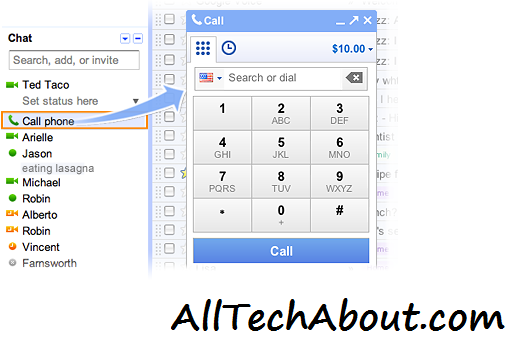
How to Make Free Phone Calls from Gmail[/caption]
Dial number Click Connect
if you use Google Chrome then Install Google voice Extension you can use it and make Phone call.we use Extension and make Call if you need any help and face any problem freely contact us.
